Sales
Sales & Checkout
Fast, touch-first selling for busy counters — on a Windows PC, an Android tablet or in the browser.
See plans & pricing22 features Offline counter billing
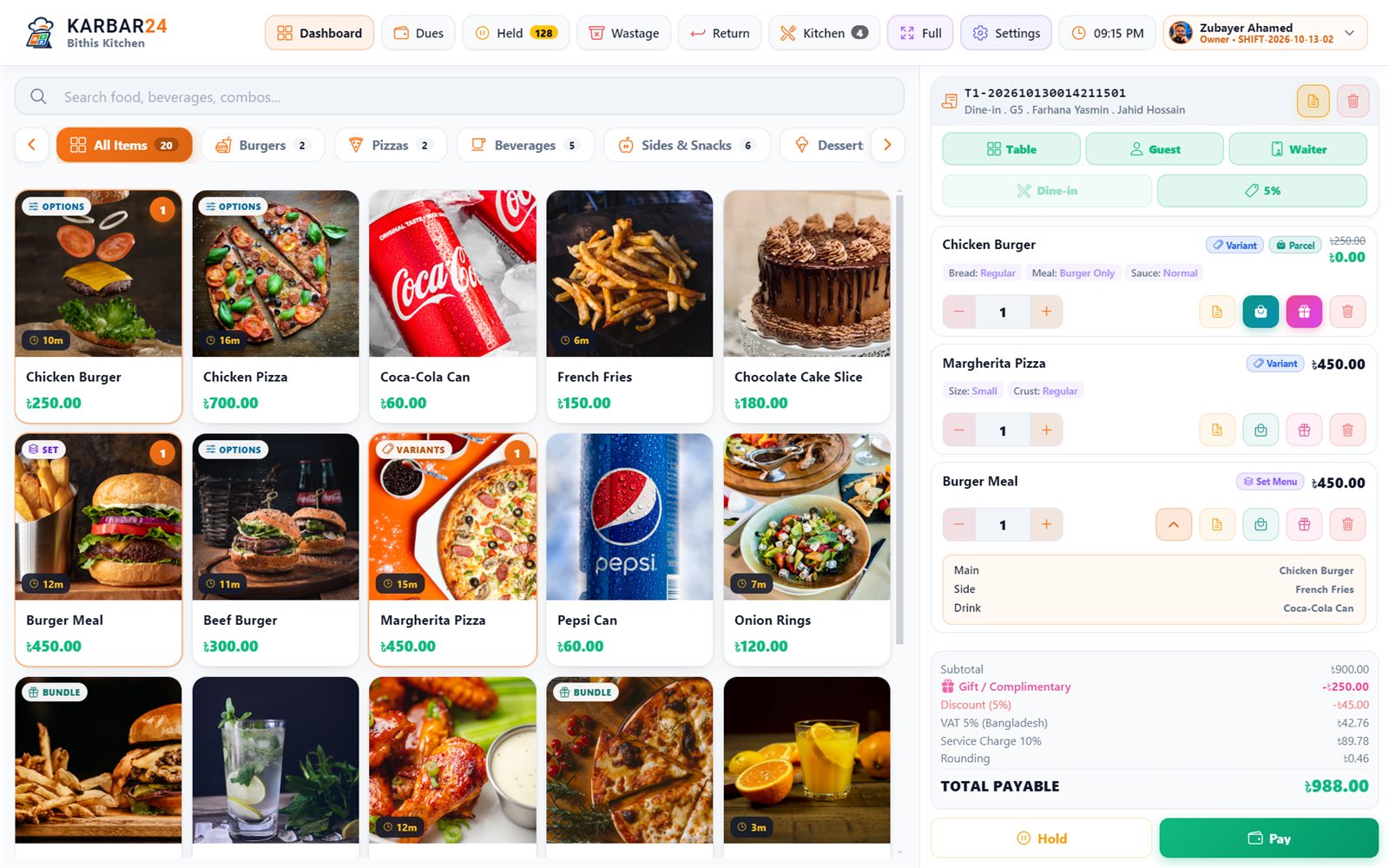
- Two-tap sale
- Split payment across cash, card, mobile and gift cards
- Returns and exchanges
- Sell by weight
Everything included
What’s in Sales & Checkout
22 features in 4 groups. Planned items are marked “Coming soon”, and Cloud-only items are marked “Cloud”.
- FreeIncluded on every plan
- PremiumPremium report — included on Pro and Ultra, or add just this report to Lite or Standard
- CloudKarbar24 Cloud (early access)
- Coming soonIn development — not yet available
Selling
7- Two-tap sale Complete a sale with minimal interaction; variants, options and modifiers open in a single sheet.
- Product grid Large, touch-friendly tiles with a category rail and sub-categories.
- Live product search Find any item as you type.
- Barcode selling Scan with a USB or Bluetooth barcode scanner to add an item to the cart.
- Stock & offer flags Low-stock and out-of-stock flags, and a "was" price with a -N% badge on items on offer.
- Sell by weight or in parts Sell 1.25 kg or 0.5 L from a quantity pad; receipts, tickets and stock follow the part.
- Keyboard shortcuts F-keys for customer, table, waiter, discount, hold and pay — the whole counter works from the keyboard.
Cart & transaction
5- Cart editing Add or remove items and adjust quantities with a calculator keypad; every removal is logged.
- Line notes, complimentary & parcel Mark one line or the whole order as complimentary or parcel, and add notes.
- Item and order discounts Discount a line or the whole order within the limit of your role.
- Supervisor approval A discount above the cashier's limit needs a supervisor PIN, recorded on the order.
- Coupons & automatic offers Campaigns apply automatically or with a coupon code at checkout.
Checkout
5- Payment screen A dedicated checkout with a numeric keypad, quick-tender amounts and automatic change.
- Cash, card & mobile banking Take cash, card or bKash / Nagad / Rocket / Upay, with the reference number stored.
- Split payment Mix cash, cards, wallets, gift cards and loyalty points on one bill.
- Customer due Leave the balance on the customer's account and collect it later.
- Gift cards & loyalty points Redeem up to five gift cards and the customer's points as payment.
Returns & exchanges
5- Return items Take back some or all items of a paid bill — back in stock or written off — with a printed return slip.
- Refund any way Refund in cash, back the way it was paid, or as store credit on a gift card.
- Exchange Swap items in one go: the customer pays only the difference, or gets the rest back.
- Return rules Mark products not returnable or set a return window; only a manager can go outside the rules.
- Return at another outlet CloudFind and take back a bill sold at any outlet of the business.
Keep exploring
More of what Karbar24 does.
One system, 24 capability areas — from the counter and the kitchen to stock, staff and reports.
- 02 · OrdersOrders & BillsOne order engine for every order type — from the first item to the last payment, with every change on record. 12 features
- 03 · ProductsProducts & CatalogueA central product master for restaurants, cafés and shops. 20 features
- 04 · MenuMenu & ModifiersConfigure what customers can order, when they can order it and how each item can be customised. 14 features
- 05 · TablesTables & Dine-inEverything for dine-in service: floors and tables, per-chair bills, split bills, reservations and waiters with their own phones. 17 features
- 06 · KitchenKitchen & KDSOrders reach the kitchen the moment they are taken — as printed tickets at the right station or on a kitchen screen, with no internet needed. 15 features
- 07 · DeliveryDelivery & ChannelsRun your own delivery and the orders from food apps from the same counter — with zones, riders and their cash settled every day. 13 features
- 08 · InventoryInventory & StockReal-time stock with stock counts, wastage tracking and a ledger that never forgets a movement. 12 features
- 09 · RecipesRecipes & Food CostKnow what every dish costs and let every sale use up its ingredients by itself. 9 features
Plans & pricing
Start with what you need. Add more as you grow.
Compare features and limits before choosing a plan. Eligible new accounts receive 120 days of Premium, with no credit card required. Lite remains free after the trial.
Karbar24 Standalone plans
Fully offline. Each plan’s devices, businesses, branches, shops and terminals are shared by all your businesses — spread them however your business is built.
লাইট
Free
Free forever
ছোট দোকানের জন্য আসল পিওএস — একটি ডিভাইস, চিরকাল ফ্রি, ডেমো নয়।
- 30 products
- 150 sales / day
- 1 active campaign
- 1 POS device
- 1 business, 1 branch, 1 shop & 1 terminal
- Waiter app included
- Kitchen Display (KDS) included
- Not included:Local backup
- Free reports
- Not included:Premium reports not included — optional: buy only the ones you want, or get all with প্রো
- Not included:Ultra reports not included — optional: buy only the ones you want, or get all with আল্ট্রা
- সবচেয়ে জনপ্রিয়
স্ট্যান্ডার্ড
৳199/ month
Billed monthly · cancel anytime
ব্যস্ত কাউন্টারের জন্য — ৩০০ পণ্য ও প্রতি টার্মিনালে দিনে ৩০০ বিক্রি, ২টি ডিভাইস। যে প্রিমিয়াম রিপোর্ট দরকার শুধু সেটাই যোগ করুন।
- 300 products
- 300 sales / day
- 5 active campaigns
- 2 POS devices
- 2 businesses, 2 branches, 2 shops & 2 terminals
- Waiter app included
- Kitchen Display (KDS) included
- Local backup
- Free reports
- Not included:Premium reports not included — optional: buy only the ones you want, or get all with প্রো
- Not included:Ultra reports not included — optional: buy only the ones you want, or get all with আল্ট্রা
প্রো
৳299/ month
Billed monthly · cancel anytime
৬টি পর্যন্ত ডিভাইস, ব্যবসা, ব্রাঞ্চ, শপ ও টার্মিনাল — ১,০০০ পণ্য, প্রতি টার্মিনালে দিনে ১,০০০ বিক্রি ও সব প্রিমিয়াম রিপোর্ট (আল্ট্রা রিপোর্ট আলাদা করে যোগ করা যায়)।
- 1,000 products
- 1,000 sales / day
- 20 active campaigns
- 6 POS devices
- 6 businesses, 6 branches, 6 shops & 6 terminals
- Waiter app included
- Kitchen Display (KDS) included
- Local backup
- Free reports
- All premium reports
- Not included:Ultra reports not included — optional: buy only the ones you want, or get all with আল্ট্রা
আল্ট্রা
৳499/ month
Billed monthly · cancel anytime
পণ্য ও বিক্রির কোনো সীমা নেই, সব প্রিমিয়াম ও আল্ট্রা রিপোর্ট, আর ২০টি পর্যন্ত ডিভাইস, ব্যবসা, ব্রাঞ্চ, শপ ও টার্মিনাল।
- Unlimited products
- Unlimited sales / day
- Unlimited active campaigns
- 20 POS devices
- 20 businesses, 20 branches, 20 shops & 20 terminals
- Waiter app included
- Kitchen Display (KDS) included
- Local backup
- Free reports
- All premium reports
- All Ultra reports (Profit & Loss, Food Cost % and more)
ক্লাউড স্টার্টার
কিচেন ও ওয়েটারসহ একটি আউটলেট
See sales and reports from anywhere, manage every POS terminal from one browser panel, and order custom reports made for your business. Cloud plans are set up with our team — contact us for pricing and availability.
যেকোনো জায়গা থেকে রিপোর্ট — অনলাইন ড্যাশবোর্ড ও সব রিপোর্ট ক্লাউড অ্যাডমিন প্যানেল থেকে প্রতিটি পিওএস টার্মিনাল পরিচালনা ওয়েটার অ্যাপ — আনলিমিটেড ডিভাইস কিচেন ডিসপ্লে (KDS) — আনলিমিটেড স্ক্রিন
Custom reports, made for your business
Need a report that isn’t in Karbar24 yet — for your accountant, head office or investors? Tell us what you want to see. We price each report by its design, what it has to do and how soon you need it. You pay, we build it, and the report is yours.
Request a custom reportHow it works
- Tell us what you needWhat the report should show, how it should look and when you need it.
- Get a priceBased on the design, the features and the priority you choose.
- Pay for the reportOnly for the reports you order — nothing changes on your plan.
- Get your reportWe build it for your business and hand it over.
Need help choosing a plan?
Tell us how many counters, outlets and devices you use. We’ll help you compare suitable plans.
FAQs
Before you choose
Answers about devices, offline use, plans and setup.
Does Karbar24 work without internet?
Yes. Karbar24 runs on the device itself, not in a browser waiting for a server. Billing, KOT printing, split bills, discounts and day-end reports all work with no internet at all. On Standalone the internet is only needed for the licence check and app updates. On Karbar24 Cloud, terminals also keep selling offline and send their sales to the cloud when the connection is back.
What platforms are supported?
Karbar24 POS runs on Windows desktop and Android (phones and tablets), plus a web version (PWA). The Kitchen Display runs on Windows and on Android tablets and TV boxes, and the Waiter app on Android phones. One account, the same app everywhere, in Bangla or English.
Is there a free version?
Yes — Lite is free forever: 30 products, 150 sales a day and the free reports, on one device (backup to a file starts on Standard). It is a real POS, not a demo. Every new account first gets a 120-day free trial — unlimited products and sales, every premium and Ultra report, and up to 2 devices — with no card.
Standalone or Cloud — which do I need?
Both run the same POS app and both keep selling without internet — the difference is where your reports live and where you manage from. Standalone keeps everything on your devices: you set up and run the business on the POS, and you see reports on the POS device itself — there is no online portal for reports. Depending on the plan it runs on 1 to 20 devices; each device keeps its own sales, and the main device sends the menu and settings to the others with update files. Karbar24 Cloud keeps your sales and reports on our cloud server, so you can see them from anywhere in the world, and lets you manage every POS terminal — menu, prices, staff, settings and lost devices — from the Cloud admin panel in a browser. Every Cloud plan includes every premium and Ultra report, custom reports can be made on request, and Cloud is in early access now. The Kitchen Display and Waiter apps work with both. You can start on Standalone and move to Cloud with your data later.
Can I run several businesses?
Yes. On Standalone, devices, businesses, branches, shops and terminals are counted across your whole account: Lite has 1 of each, Standard 2, Pro 6 and Ultra 20, spread however your business is built — each business with its own menu, stock, staff and reports. On Standard, Pro and Ultra you can add an extra business (৳30/month), branch (৳25), shop (৳20) or POS terminal (৳30) without changing plan. On Cloud, Starter and Standard have 1 business and Pro has 2; add more at ৳299 a month each, or agree your own numbers on Enterprise.
Will you help me set up my menu?
Yes. Switching from paper or another POS? Send us your menu as a photo or spreadsheet and we set up your first 100 items for free.

Try it in your restaurant.
Start with 120 days of Premium, or request a demo and we will show you around.