



Restaurant POS, Waiter App & Kitchen Display

Simplify Restaurant Operations.Serve Your Guests Faster.

Connect your counter, waiters and kitchen with Karbar24 for smoother operations, happier guests and higher profits.

  • Faster order flowTake orders and send them to the kitchen instantly.
  • Better team coordinationCounter, waiters and kitchen work together in real time.
  • Fewer mistakesClear orders, modifiers and notes.
  • Happier guests, more profitFaster service brings guests back.
  • Counter POSDesktop · Android
  • Waiter AppAndroid
  • Kitchen DisplayWindows · Android · Smart TV
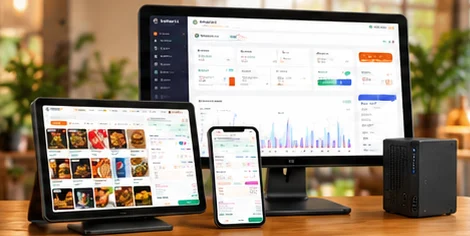
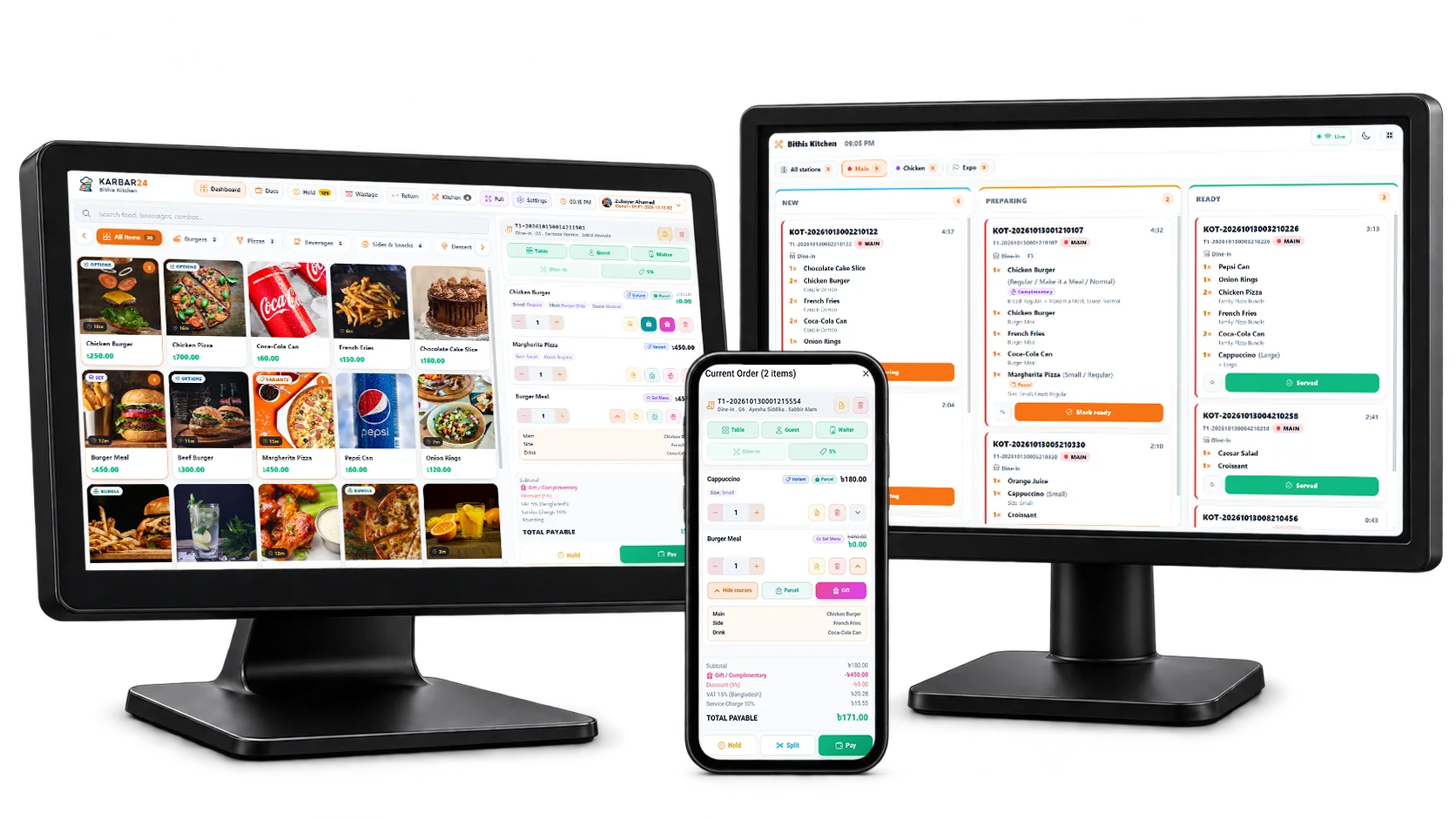
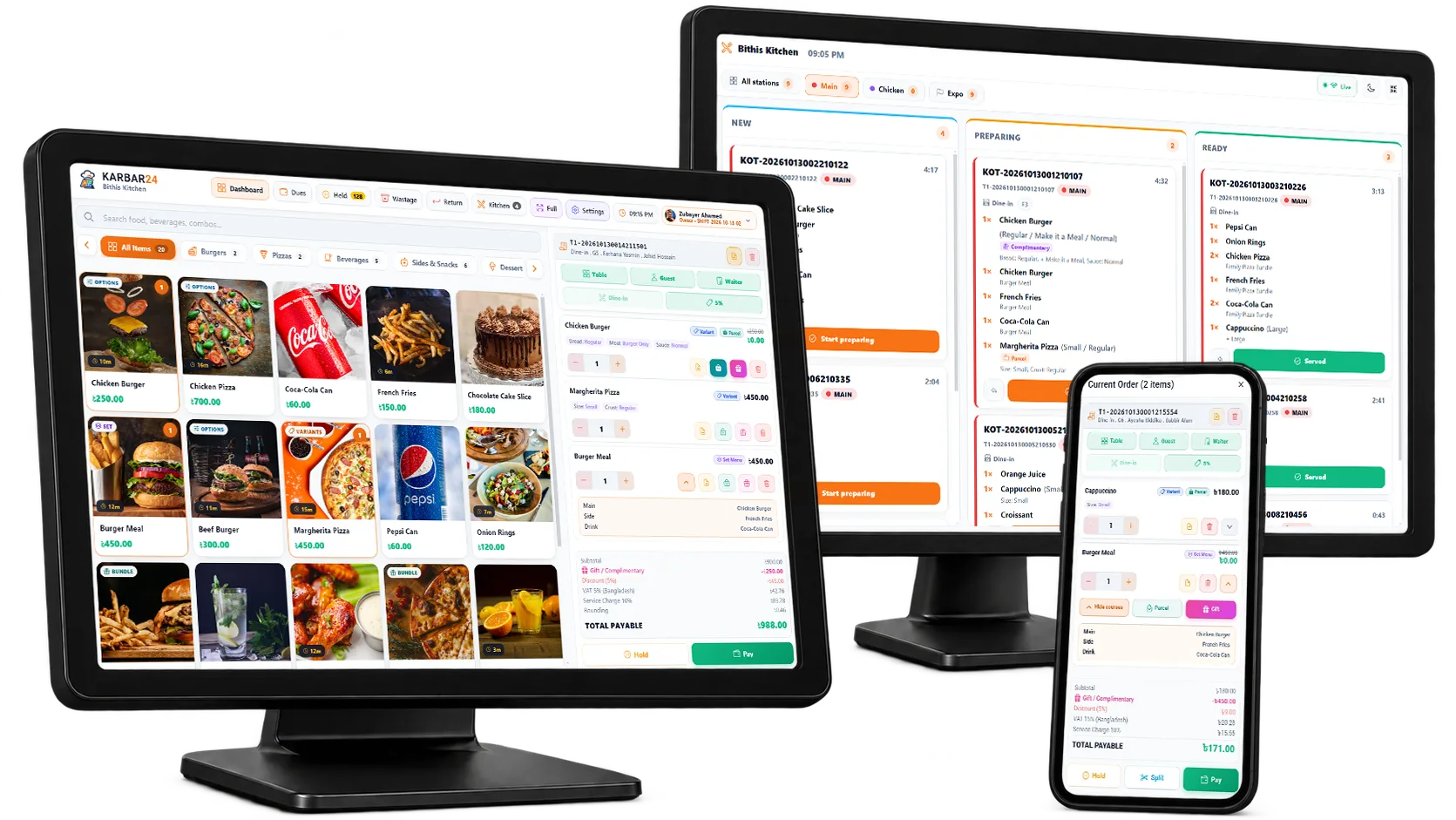
Karbar24 Counter POS, Kitchen Display and Waiter App working together

One order. A clearer path from table to bill.

A clear workflow for your front-of-house team, kitchen and counter.

  1. Take the orderAdd items and guest preferences at the table or counter.
  2. Send it to the kitchenGive each station the details it needs.
  3. Follow preparationSee which orders are being prepared and which are ready.
  4. Prepare the billReview the order and complete billing at the counter.

Three apps. One connected workflow.

The right screen for every part of service.

Give each team the tools they need, while keeping the order moving from guest to kitchen to bill.

Counter POS

Keep your counter ready for the rush.

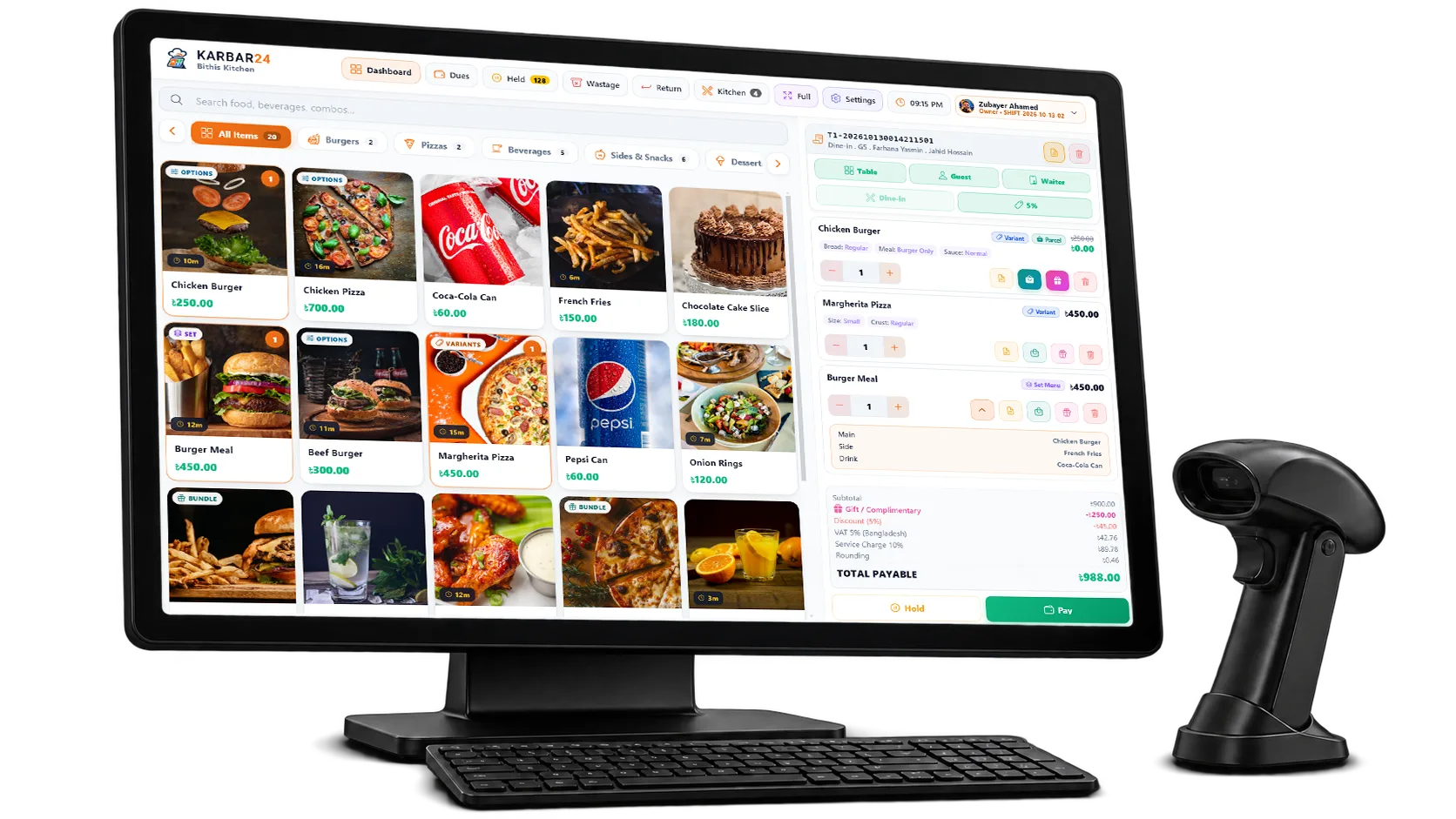
Find items, review quantities and choices, and prepare clear bills in one workspace. On desktop and Android.

  • Visual menu with imagesFind items quickly with a clear product layout.
  • Review quantities & optionsSet modifiers and notes on each item before billing.
  • Fast billing, every way to payCash, card, bKash, Nagad and split payments.
  • All in one workspaceOrder details, totals and customer info together.
  • Desktop
  • Android
See Counter POS
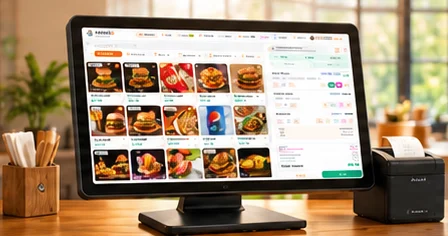
Karbar24 Counter POS on a counter monitor — menu grid and a current order

Waiter App

Take the order where the guest is.

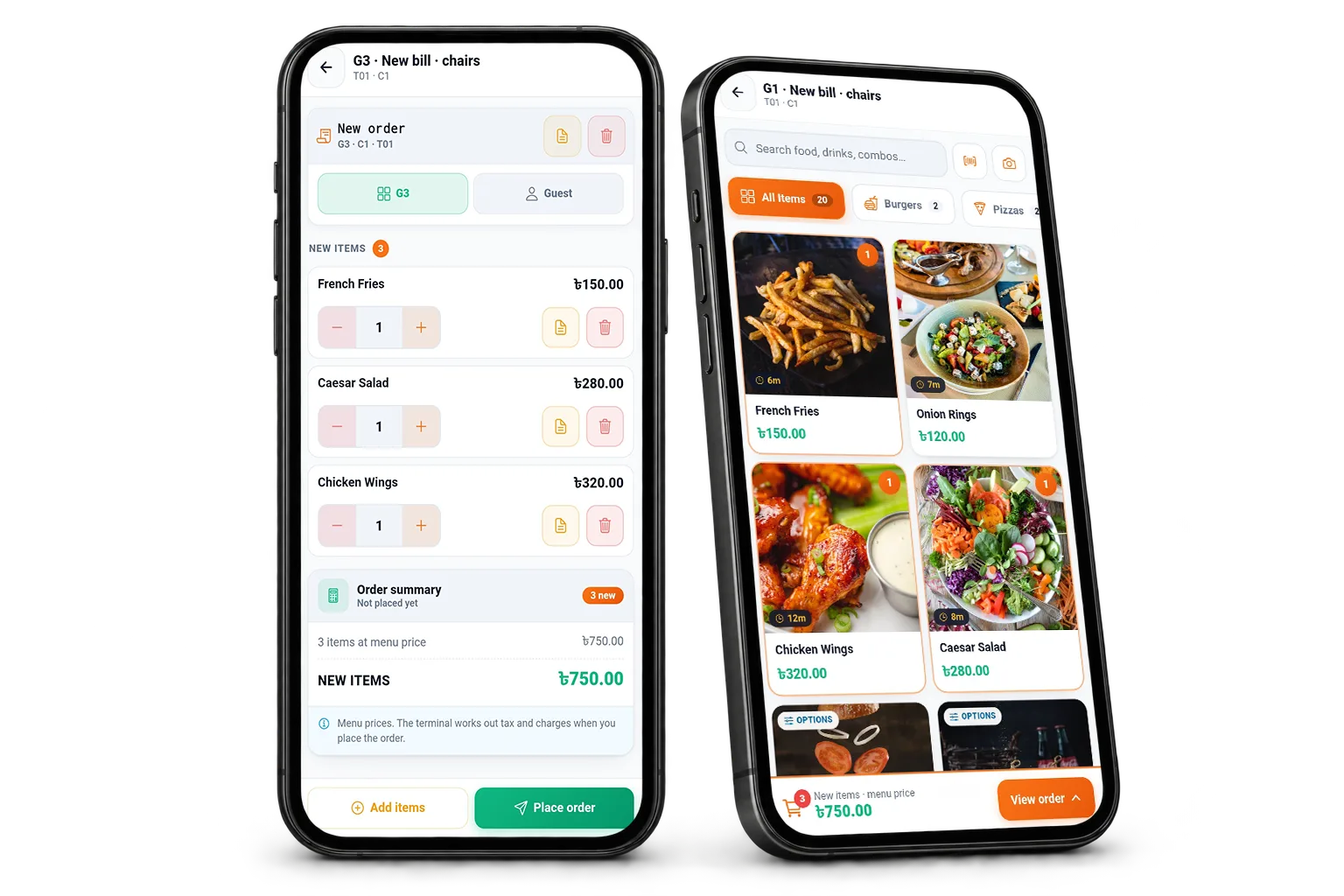
Capture items, options and notes on an Android phone, then send the order straight into your kitchen workflow.

  • Select menu items while speaking with the guest.
  • Record quantities and available item options.
  • Keep table orders connected with the counter and kitchen.
  • Faster service and happier guests.
  • Android phones
See Waiter App
  • Easy to take ordersRight at the table
  • Add special requestsOptions and notes per item
  • Send to kitchen instantlyStraight to the kitchen screen
Waiter App on two phones — the order list and the menu

Kitchen Display System (KDS)

Give the kitchen a clear view of the next order.

Read items and quantities, follow preparation and mark food ready to serve. Included on every plan.

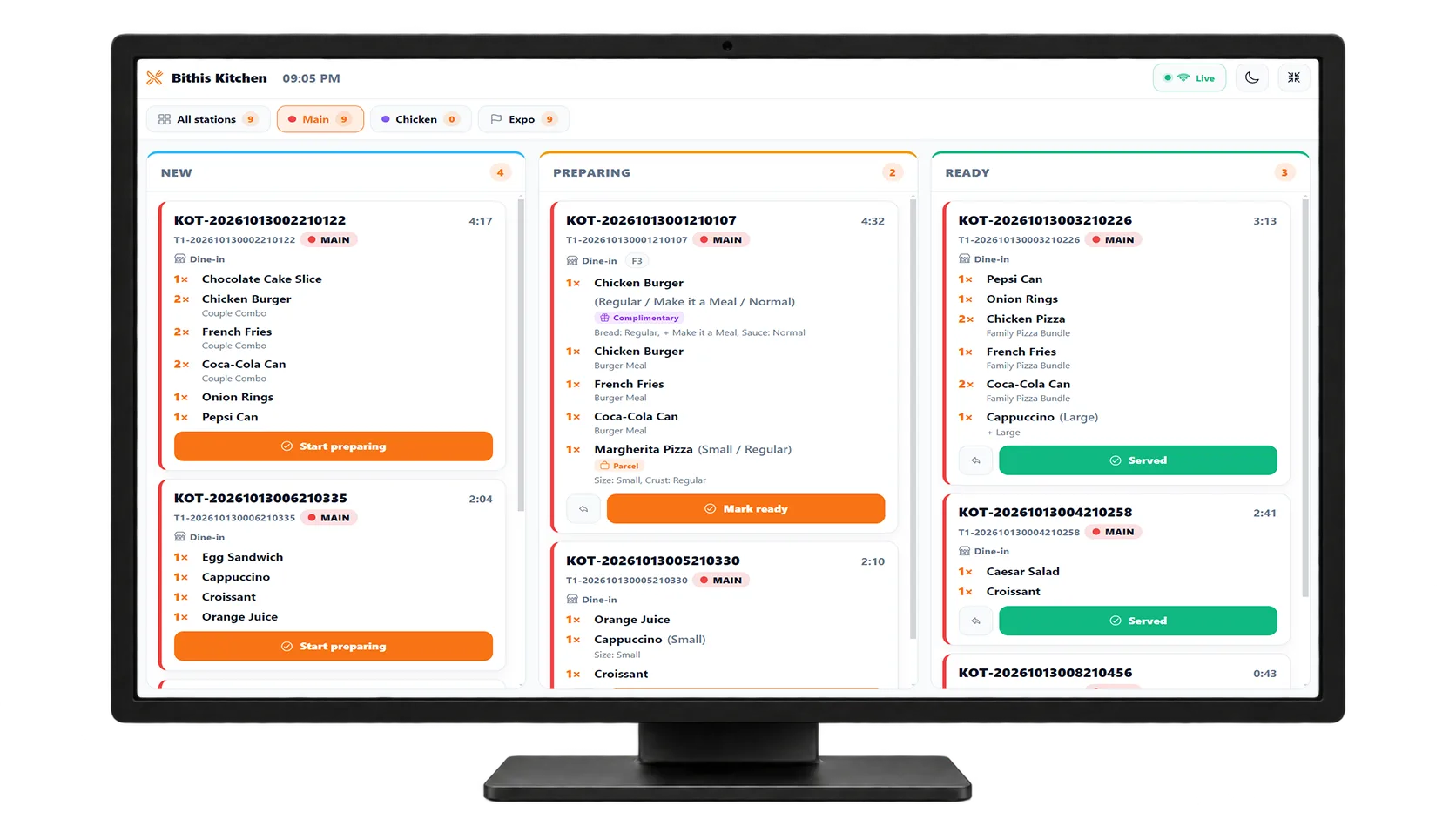
  • See live orders with items and quantities.
  • Track preparation status for each order.
  • Mark orders ready to serve with one tap.
  • Help kitchen and service teams stay in sync.
  • Windows
  • Android
  • Smart TV
See Kitchen Display
  • Live ordersSee new orders instantly
  • Faster serviceReduce waiting time
  • Better coordinationKeep kitchen and service in sync
Kitchen Display on a wall screen — tickets in New, Preparing and Ready

One order flow — from the table to the kitchen to the counter.

A setup that fits your restaurant

One counter or a connected team. Find your setup.

Run Counter POS on Windows or Android for everyday orders and billing. Standalone keeps billing, reports and settings on your devices. Karbar24 Cloud adds reports you can see from anywhere and one browser panel to manage every terminal. Kitchen Display and the Waiter App work with both.

Without internet, the counter can still

  • Take orders and prepare bills
  • Print receipts and KOTs with a working printer connection
  • Split bills and record payments
  • Review day-end reports

Standalone

Everything on your devices

Standalone — Karbar24 POS with billing and reports on the device

Billing, reports and settings live on the POS device — there is no online portal. Backup to a file comes with every paid plan; with several devices, the main one shares menu and settings through update files.

  • No internet needed to bill or see reports
  • Reports on the POS device
  • Kitchen Display and Waiter App included
Compare Standalone plans

Karbar24 Cloud

Reports from anywhere · early access

Cloud setup — POS terminal, Waiter App and Kitchen Display on one local network

Your sales and reports are kept on the cloud server, so you can see them from anywhere in the world, and every POS terminal is managed from the Cloud admin panel. Terminals keep billing without internet and sync when it returns.

  • Reports from anywhere
  • Manage every terminal from a browser
  • Waiter App and Kitchen Display included
See Cloud plans

Tell us how many counters, outlets and devices you use — we’ll help you compare suitable plans

Plans & pricing

Start with what you need. Add more as you grow.

Compare features and limits before choosing a plan. Eligible new accounts receive 120 days of Premium, with no credit card required. Lite remains free after the trial.

Karbar24 Standalone plans

Fully offline. Each plan’s devices, businesses, branches, shops and terminals are shared by all your businesses — spread them however your business is built.

Compare all plans
  • Lite

    Free

    Free forever

    A real POS for the smallest shops — one device, free forever, not a demo.

    • 30 products
    • 150 sales / day
    • 1 active campaign
    • 1 POS device
    • 1 business, 1 branch, 1 shop & 1 terminal
    • Waiter app included
    • Kitchen Display (KDS) included
    • Not included:Local backup
    • Free reports
    • Not included:Premium reports not included — optional: buy only the ones you want, or get all with Pro
    • Not included:Ultra reports not included — optional: buy only the ones you want, or get all with Ultra
    Start my free trial
  • Pro

    ৳299/ month

    Billed monthly · cancel anytime

    Up to 6 devices, businesses, branches, shops and terminals — 1,000 products, 1,000 sales a day per terminal and every premium report (Ultra reports can be added one by one).

    • 1,000 products
    • 1,000 sales / day
    • 20 active campaigns
    • 6 POS devices
    • 6 businesses, 6 branches, 6 shops & 6 terminals
    • Waiter app included
    • Kitchen Display (KDS) included
    • Local backup
    • Free reports
    • All premium reports
    • Not included:Ultra reports not included — optional: buy only the ones you want, or get all with Ultra
    Start my free trial
  • Ultra

    ৳499/ month

    Billed monthly · cancel anytime

    No product or sales caps, every premium and Ultra report, and up to 20 devices, businesses, branches, shops and terminals.

    • Unlimited products
    • Unlimited sales / day
    • Unlimited active campaigns
    • 20 POS devices
    • 20 businesses, 20 branches, 20 shops & 20 terminals
    • Waiter app included
    • Kitchen Display (KDS) included
    • Local backup
    • Free reports
    • All premium reports
    • All Ultra reports (Profit & Loss, Food Cost % and more)
    Start my free trial
Early access

Cloud Starter

One outlet with a kitchen and waiters

See sales and reports from anywhere, manage every POS terminal from one browser panel, and order custom reports made for your business. Cloud plans are set up with our team — contact us for pricing and availability.

  • Reports from anywhere — online dashboard & every report
  • Manage every POS terminal from the Cloud admin panel
  • Waiter app — unlimited devices
  • Kitchen display (KDS) — unlimited screens
Only on Karbar24 Cloud

Custom reports, made for your business

Need a report that isn’t in Karbar24 yet — for your accountant, head office or investors? Tell us what you want to see. We price each report by its design, what it has to do and how soon you need it. You pay, we build it, and the report is yours.

Request a custom report

How it works

  1. Tell us what you needWhat the report should show, how it should look and when you need it.
  2. Get a priceBased on the design, the features and the priority you choose.
  3. Pay for the reportOnly for the reports you order — nothing changes on your plan.
  4. Get your reportWe build it for your business and hand it over.

Need help choosing a plan?

Tell us how many counters, outlets and devices you use. We’ll help you compare suitable plans.

Moving to a lower plan does not delete your existing business records. Limits may restrict new activity.

See it in action

See the tools your team will use.

Explore real product screens, from entering an order to preparing the final bill. Choose an app and enlarge any screenshot for a closer look.

Karbar24 Counter POS, Waiter App and Kitchen Display side by side

Product screenshots

A closer look at the tools your team will use.

Browse real product screens and see how everyday restaurant tasks are organised.

Screenshot appearance

Counter POS — menu grid with photos, set menus and a dine-in order

View installation options

Counter POS — menu grid with photos, set menus and a dine-in order

1 / 7
Counter POS — menu grid with photos, set menus and a dine-in order

FAQs

Before you choose

Answers about devices, offline use, plans and setup.

Does Karbar24 work without internet?

Yes. Karbar24 runs on the device itself, not in a browser waiting for a server. Billing, KOT printing, split bills, discounts and day-end reports all work with no internet at all. On Standalone the internet is only needed for the licence check and app updates. On Karbar24 Cloud, terminals also keep selling offline and send their sales to the cloud when the connection is back.

What platforms are supported?

Karbar24 POS runs on Windows desktop and Android (phones and tablets), plus a web version (PWA). The Kitchen Display runs on Windows and on Android tablets and TV boxes, and the Waiter app on Android phones. One account, the same app everywhere, in Bangla or English.

Is there a free version?

Yes — Lite is free forever: 30 products, 150 sales a day and the free reports, on one device (backup to a file starts on Standard). It is a real POS, not a demo. Every new account first gets a 120-day free trial — unlimited products and sales, every premium and Ultra report, and up to 2 devices — with no card.

Standalone or Cloud — which do I need?

Both run the same POS app and both keep selling without internet — the difference is where your reports live and where you manage from. Standalone keeps everything on your devices: you set up and run the business on the POS, and you see reports on the POS device itself — there is no online portal for reports. Depending on the plan it runs on 1 to 20 devices; each device keeps its own sales, and the main device sends the menu and settings to the others with update files. Karbar24 Cloud keeps your sales and reports on our cloud server, so you can see them from anywhere in the world, and lets you manage every POS terminal — menu, prices, staff, settings and lost devices — from the Cloud admin panel in a browser. Every Cloud plan includes every premium and Ultra report, custom reports can be made on request, and Cloud is in early access now. The Kitchen Display and Waiter apps work with both. You can start on Standalone and move to Cloud with your data later.

Can I run several businesses?

Yes. On Standalone, devices, businesses, branches, shops and terminals are counted across your whole account: Lite has 1 of each, Standard 2, Pro 6 and Ultra 20, spread however your business is built — each business with its own menu, stock, staff and reports. On Standard, Pro and Ultra you can add an extra business (৳30/month), branch (৳25), shop (৳20) or POS terminal (৳30) without changing plan. On Cloud, Starter and Standard have 1 business and Pro has 2; add more at ৳299 a month each, or agree your own numbers on Enterprise.

Will you help me set up my menu?

Yes. Switching from paper or another POS? Send us your menu as a photo or spreadsheet and we set up your first 100 items for free.

Make your next busy shift easier to manage.

See how Karbar24 brings orders, billing and kitchen progress into a clearer workflow. Request a demo or compare plans for your restaurant.

Switching from paper or another POS? We set up your first 100 menu items for free.